• Home
  • Forum
  • YouTube
  • CityscapeCruiser
  • Contact Us
Computer How To
Menu Close
  • Home
  • Forum
  • YouTube
  • CityscapeCruiser
  • Contact Us

Linux

How to Start/Stop and Enable/Disable FirewallD CentOS 7

January 18, 2017arstech Leave a Comment
firewalld

How to Start/Stop and Enable/Disable FirewallD CentOS 7   Start FirewallD Service # systemctl start firewalld Stop FirewallD Service # systemctl stop firewalld Check the Status of FirewallD # systemctl status firewalld Check the State of FirewallD # firewall-cmd –state… Continue Reading →
CentOS, Linux centos 7, firewalld

How To Install EPEL Repo on a CentOS and RHEL 7.x

January 11, 2017arstech Leave a Comment

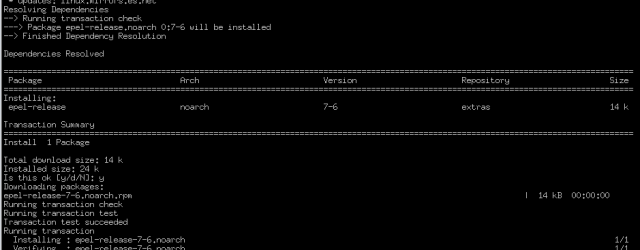
How To Install EPEL Repo on a CentOS and RHEL 7.x The following command will install EPEL Repo on a CentOS and RHEL 7.x: $ sudo yum install epel-release   Install EPEL on CentOS 8.x

CentOS, Linux centos, EPEL Repo, RHEL 7.x

How to Unlock Zimbra Accounts from Command Line

December 23, 2016arstech Leave a Comment
zimbra mail server

To unlock Zimbra account from Command Line : # /opt/zimbra/bin/zmprov ma [email protected] zimbraAccountStatus active Unlock Zimbra admin account: # /opt/zimbra/bin/zmprov ma admin zimbraAccountStatus active

Linux Zimbra

Deleting files in Linux – Argument list too long

December 22, 2016arstech Leave a Comment
Argument list too long

Deleting files in Linux – Argument list too long When  you’re trying to delete  large number of files, you may have error: Argument list too long As solution you can use command: # find . -type f -print -delete Next… Continue Reading →

Linux Argument list too long, delete, file

bind failed: Permission denied

November 22, 2016arstech Leave a Comment

Bind Failed: Permission denied How to solve problem when you cant execute ffmpeg form user and ports are below 1024. In UNIX-like systems, non-root users are unable to bind to ports lower than 1024. You need to be root to… Continue Reading →

FFmpeg, Linux bind, bind failed, ffmpeg, Permission denied, port

Showing the original visitors IP addresses in VestaCP

November 15, 2016arstech Leave a Comment

If you using VestaCP with Cloudflare Global Content Delivery Network (CDN) in logs you will have problem with showing the original visitors IP addresses in logs. Its very easy to fix. Add to NGINX main config file (before include and… Continue Reading →

CentOS, Linux, Ubuntu Cloudflare, Nginx, show original IP, vestacp

Intel Visual Compute Accelerator (VCA) crash CentOS 7

November 9, 2016arstech Leave a Comment

Intel Visual Compute Accelerator (VCA) can crash CentOS 7 if yiu dont have kernel option “nosmap”. Due to CentOS 7.1 not having full support for Intel® Xeon® Processor E5-2600 v4 family, the kernel option “nosmap” must be added when booting… Continue Reading →

CentOS, Linux Crash CentOS, E3-1200, E5-2600, Intel VCA, kernel option, nosmap, Visual Compute Accelerator

MySQL Connect Remote Database

October 25, 2016arstech Leave a Comment
mysql

MySQL Connect Remote Database For remotely access to mysql database use command: mysql -u User -p -h RemoteMySQLdatabaseIP Were:  User – remote MySQL server user,  RemoteMySQLdatabaseIP – remote MySQL database IP example: # mysql -u User_Name -p -h 11.22.33.44 Enter password:… Continue Reading →

Linux, MySQL mysql, mysql database, mysql remote access, mysql remote connection, mysql server

Problem with IPv6 sudo apt-get update/upgrade

October 14, 2016arstech Leave a Comment

We can force to update Ubuntu using ipv4 apt-get -o Acquire::ForceIPv4=true update apt-get -o Acquire::ForceIPv4=true upgrade  

Linux, Ubuntu apt-get update, force ipv4 update, ubuntu update stuck ipv6

VNC error – only supporting 8,15, 16 and 25 bpp..

October 13, 2016arstech Leave a Comment

VNC error – only supporting 8,15, 16 and 25 bpp rdp connections During Remote Desktop Connection (RDP) from Windows to Linux you can face with VNC error “only supporting 8,15, 16 and 25 bpp rdp connections” It’s very easy to… Continue Reading →

Linux, Windows centos, Linux, rdp, Remote Desktop Connection, VNC, VNC error

Post navigation

← Older Articles
Newer Articles →

Tags

Apache centos centos 7 CentOS 8 convert debian DNS Docker EPEL fdisk ffmpeg FreeNAS FreeSWITCH FusionPBX git GitLab Hard drive hostname iptables java Linux mysql Nginx Nvidia password port proxmox Python rdp redhat RHEL root script SIP sox SSH tcpdump Ubuntu Ubuntu 18.04 vestacp VMWARE Windows Windows 10 yum Zimbra

Tags

Apache centos centos 7 CentOS 8 convert debian DNS Docker EPEL fdisk ffmpeg FreeNAS FreeSWITCH FusionPBX git GitLab Hard drive hostname iptables java Linux mysql Nginx Nvidia password port proxmox Python rdp redhat RHEL root script SIP sox SSH tcpdump Ubuntu Ubuntu 18.04 vestacp VMWARE Windows Windows 10 yum Zimbra

Recent Posts

  • Network Interface Traffic Monitoring Linux
  • How to Push an Existing Local Project to GitLab
  • Fix “Cannot open TUN/TAP dev /dev/net/tun”
  • 5 Best Hardware Crypto Wallets for 2026 – Full Review, Security Analysis & Real Usage Insights
  • Video Encoding Bitrates for 4K & 1080p — H.264 vs H.265 (HEVC)

Recent Comments

  • INSTALL IPTABLES IN DEBIAN 11 (BULLSEYE) | Bots! on Install IPtables in Debian 11 (Bullseye)
  • Upgrading php7.4 to php8.0 on Amazon Linux 2 Webserver · 18a Productions on [SOLVED] Install PHP 7/8 On Amazon Linux 2
  • Proxmox: Mise à jour impossible. - md.lu on Proxmox VE apt-get update error E: Failed to fetch https://enterprise.proxmox.com/debian/pve/dists/bullseye/InRelease 401 Unauthorized IP
  • root login ssh ubuntu - playsquare.tv on How To Allow SSH Root Login On Ubuntu 20.04
  • ubuntu ssh server root login – european-borderlands.org on How To Allow SSH Root Login On Ubuntu 20.04

Categories

  • Android
  • Asterisk
  • CentOS
  • Cisco
  • cryptocurrency
  • DNS
  • E-mail
  • elastix
  • FFmpeg
  • FreeNAS
  • FreeSWITCH
  • FusionPBX
  • General
  • IpTV
  • kloxo
  • Linux
  • MikroTik
  • MySQL
  • Network
  • News and Reviews
  • sipXecs
  • Terraform
  • Ubuntu
  • Uncategorized
  • Video
  • VMware
  • VoIP
  • Windows
  • WordPress
© 2025 Computer How To. All rights reserved.
Fashionista by aThemes