Fix Proxmox apt update "401 Unauthorized" from enterprise.proxmox.com (PVE 9, 8, 7)
"Failed to fetch https://enterprise.proxmox.com/... 401 Unauthorized" means Proxmox is using the paid enterprise repository without a subscription. Disable it, add the free no-subscription repository for PVE and Ceph, and apt update works again. Steps for Proxmox VE 9 (trixie), 8 and 7.


Failed to fetch https://enterprise.proxmox.com/debian/pve/dists/trixie/InRelease 401 Unauthorized means your Proxmox host is set to the enterprise repository, which only works with a paid subscription key. To fix it, disable the enterprise repository for PVE and Ceph and add the free no-subscription repository instead. In the web UI that's Node > Updates > Repositories: disable both enterprise entries, click Add, pick No-Subscription, then run apt update again.
Every fresh Proxmox install starts like this, so it's not a broken system. Below are the exact steps for Proxmox VE 9 (Debian 13 trixie), which uses the new .sources file format, plus Proxmox VE 8 (bookworm) and 7 (bullseye).

What the error looks like
On Proxmox VE 9 you usually get two of them, one for PVE and one for Ceph, as in this Proxmox forum thread:
Err:4 https://enterprise.proxmox.com/debian/ceph-squid trixie InRelease
  401  Unauthorized [IP: 170.130.165.90 443]
Err:5 https://enterprise.proxmox.com/debian/pve trixie InRelease
  401  Unauthorized [IP: 170.130.165.90 443]
E: The repository 'https://enterprise.proxmox.com/debian/pve trixie InRelease' is not signed.
TASK ERROR: command 'apt-get update' failed: exit code 100
On older versions the same line says bookworm (PVE 8) or bullseye (PVE 7). The follow-up "is not signed" message is just apt complaining about the repository it couldn't download. It goes away with the 401.
About "Unauthorized IP": the IP in brackets is Proxmox's server, not yours. Your IP isn't blocked. The 401 simply means "no valid subscription key for this host".
Fix in the web UI (all versions)
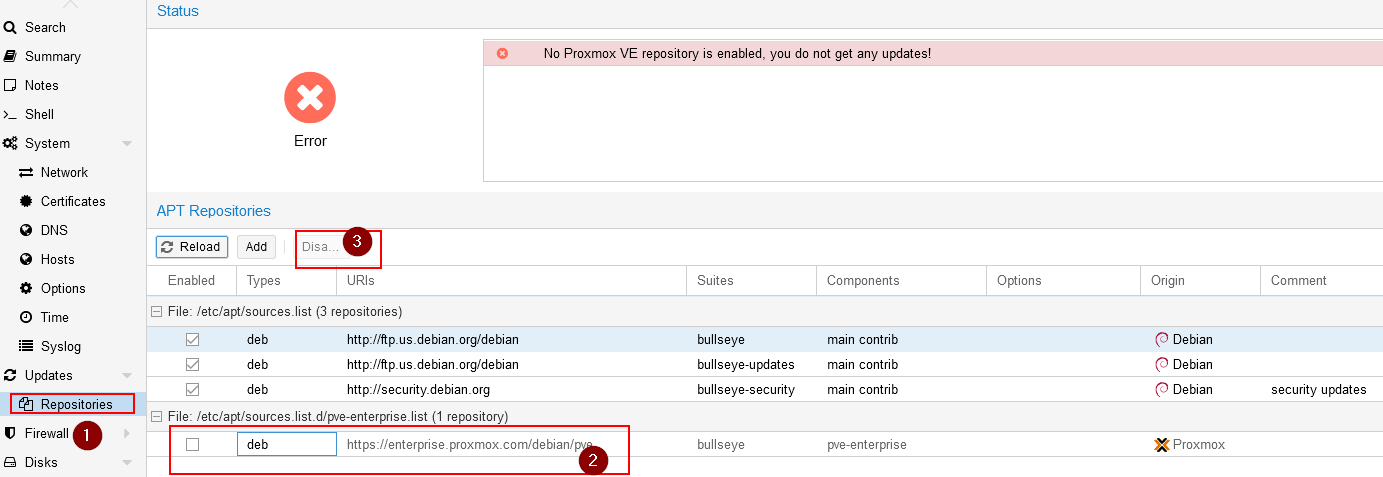
- Select your node, then Updates > Repositories.
- Select the
pve-enterpriserepository and click Disable. Do the same for the Ceph enterprise entry (ceph-squidon PVE 9,ceph-quincyorceph-reefon PVE 8).
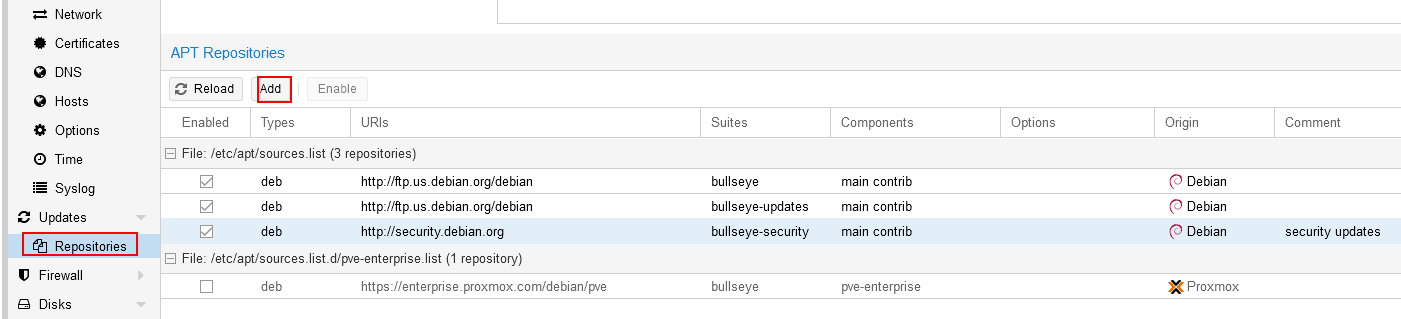
- Click Add, choose No-Subscription, and click Add.
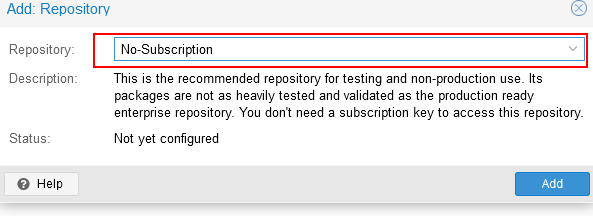
- If you use Ceph, click Add again and choose Ceph Squid No-Subscription (the name matches your Ceph version).
- Go to Updates, click Refresh. It should finish without errors.

The GUI writes the same files as the shell method below, so you can mix both.
Fix from the shell: Proxmox VE 9 (trixie, .sources format)
Proxmox VE 9 moved apt to the deb822 format. A fresh install has these files in /etc/apt/sources.list.d/:
ls /etc/apt/sources.list.d/
# ceph.sources  debian.sources  pve-enterprise.sources
1. Disable the PVE enterprise repository. In deb822 you don't comment lines out, you add Enabled: false:
echo 'Enabled: false' >> /etc/apt/sources.list.d/pve-enterprise.sources
2. Add the PVE no-subscription repository. The Proxmox package repository docs recommend /etc/apt/sources.list.d/proxmox.sources:
cat > /etc/apt/sources.list.d/proxmox.sources <<'EOF'
Types: deb
URIs: http://download.proxmox.com/debian/pve
Suites: trixie
Components: pve-no-subscription
Signed-By: /usr/share/keyrings/proxmox-archive-keyring.gpg
EOF
3. Switch Ceph to no-subscription. Even if you never use Ceph, the default ceph.sources points to enterprise and throws the second 401. Replace it:
cat > /etc/apt/sources.list.d/ceph.sources <<'EOF'
Types: deb
URIs: http://download.proxmox.com/debian/ceph-squid
Suites: trixie
Components: no-subscription
Signed-By: /usr/share/keyrings/proxmox-archive-keyring.gpg
EOF
4. Update and upgrade:
apt update
apt full-upgrade
Use full-upgrade (or dist-upgrade) on Proxmox, not plain apt upgrade. Proxmox updates often add or remove packages, such as new kernels, and plain upgrade holds those back.
Fix from the shell: Proxmox VE 8 and 7 (.list format)
Older versions use one-line .list files. Comment out the enterprise lines:
sed -i 's/^deb/# deb/' /etc/apt/sources.list.d/pve-enterprise.list
sed -i 's/^deb https:\/\/enterprise/# deb https:\/\/enterprise/' /etc/apt/sources.list.d/ceph.list
Then add the no-subscription repository. On PVE 8:
echo "deb http://download.proxmox.com/debian/pve bookworm pve-no-subscription" > /etc/apt/sources.list.d/pve-no-subscription.list
On PVE 7, replace bookworm with bullseye. If you use Ceph on PVE 8, add the matching Ceph line, for example deb http://download.proxmox.com/debian/ceph-reef bookworm no-subscription.
Run apt update and apt full-upgrade. Both versions are end of life now (PVE 7 since 2024, PVE 8 since August 2026), so plan the upgrade to Proxmox VE 9.
Still failing after the switch?
Still a 401 from enterprise.proxmox.com. An enterprise entry is still active somewhere. Find it:
grep -r "enterprise.proxmox.com" /etc/apt/sources.list /etc/apt/sources.list.d/
Any hit in a .sources file without Enabled: false, or an uncommented deb line in a .list file, still counts.
"Target Packages is configured multiple times". After an upgrade from 8 to 9 you can end up with the no-subscription repo in both an old .list file and a new .sources file. Delete or comment out the old .list entry. apt modernize-sources can convert leftover .list files to the new format for you.
"Conflicting values set for option Signed-By". Same cause: the same repository defined twice with different keyring settings. Keep only one definition.
SSL certificate error with download.proxmox.com. Use http:// for download.proxmox.com, as above. Packages are verified with GPG signatures, so HTTP is safe here.
You have a subscription and still get 401. Check the key status with pvesubscription get, and remember that every node in a cluster needs its own key.
Is the no-subscription repository safe?
Yes for homelabs and small setups. It gets the same packages as enterprise, just earlier and with less testing, and Proxmox labels it as not recommended for production. If a cluster runs a business, the subscription buys you the more conservative repository and support.
The "No valid subscription" popup when you log in is separate from this error. It's cosmetic and doesn't affect updates.
My take
On every new Proxmox host, switching the repositories is the first thing I'd do, before creating any VM. It takes two minutes, and until you do it you get no security updates. After that, usual first steps are setting up your VMs with the QEMU guest agent and, if you build a cluster, knowing what to do when it says cluster not ready, no quorum.
FAQ
Why does Proxmox apt update fail with 401 Unauthorized?
Because the enterprise repository is enabled and the host has no subscription key. Every fresh install starts with it enabled. Disable it and add the no-subscription repository.
What does "Unauthorized IP" mean in the Proxmox error?
Nothing about your IP. The address in brackets is Proxmox's repository server. The 401 just means no valid subscription for the enterprise repo.
How do I disable the enterprise repository in Proxmox VE 9?
In the GUI, Node > Updates > Repositories > select pve-enterprise > Disable. In the shell, add Enabled: false to /etc/apt/sources.list.d/pve-enterprise.sources. Do the same for ceph.sources.
What is the Proxmox VE 9 no-subscription repository?
http://download.proxmox.com/debian/pve with suite trixie and component pve-no-subscription, signed with /usr/share/keyrings/proxmox-archive-keyring.gpg. For Ceph it's http://download.proxmox.com/debian/ceph-squid with component no-subscription.
Do I need the Ceph repository if I don't use Ceph?
Not really, but a fresh PVE 9 install has the Ceph enterprise repo enabled, which causes a second 401. Either switch it to no-subscription or disable it.