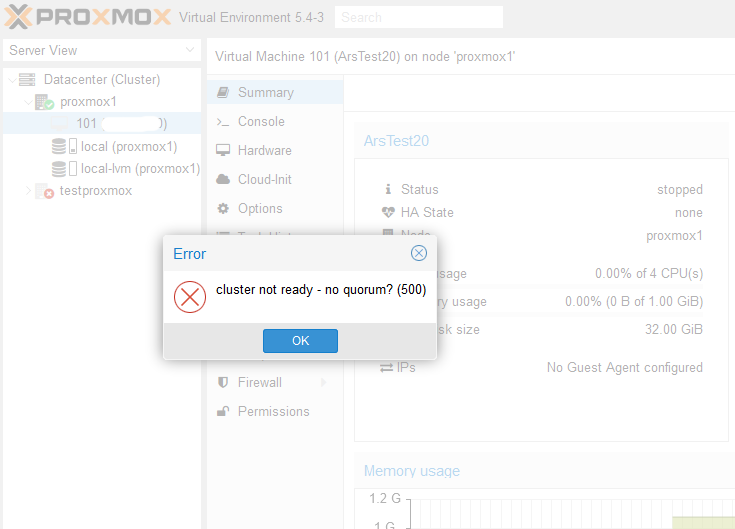
Proxmox "cluster not ready - no quorum? (500)": quick fix and permanent fixes
"cluster not ready - no quorum? (500)" means your Proxmox node can't see enough cluster members to vote. Run pvecm expected 1 to get it working right now, then fix the real cause: a dead node, a broken corosync link, a 2-node cluster without a QDevice, or a leftover cluster config.


cluster not ready - no quorum? (500) means your Proxmox node is part of a cluster but can't see enough cluster members to have a majority vote. Without quorum, Proxmox makes /etc/pve read-only, so you can't start VMs or change VM and cluster settings.
To get running right now, on the node that's still up:
pvecm expected 1
That tells this node to accept itself as a majority until corosync restarts. It's a workaround, not a fix. Below is what causes the error, how to check, and the permanent fix for each case, including 2-node clusters, which hit this error more than anything else.
Why Proxmox needs quorum
Every node in a Proxmox cluster has one vote. The cluster only allows changes when more than half of the votes are present. That protects you from split brain: two halves of a cluster both thinking they're in charge and starting the same VM twice on shared storage.
The math is unforgiving for small clusters:
| Nodes | Votes needed | Nodes that can fail |
|---|---|---|
| 2 | 2 | 0 |
| 3 | 2 | 1 |
| 4 | 3 | 1 |
| 5 | 3 | 2 |
So in a 2-node cluster, losing either node means no quorum. That's by design, not a bug.
Step 1: check the quorum status
pvecm status
Look at the Votequorum information section:
Expected votes:   2
Total votes:      1
Quorum:           2 Activity blocked
Flags:
Total votes lower than Quorum means no quorum. Then check corosync, which handles the cluster communication:
systemctl status corosync pve-cluster
corosync-cfgtool -s
journalctl -u corosync -b --no-pager | tail -50
corosync-cfgtool -s shows each link to the other nodes. A link that says disconnected points to a network problem.
The quick fix: pvecm expected 1
pvecm expected 1
This lowers the expected votes so the single surviving node counts as a majority. /etc/pve becomes writable and you can start VMs again.
Two things to know:
- It's temporary. It resets when corosync restarts or the other node comes back. That's fine and intended.
- Only use it when the other node is really down. If the other node is running but just can't reach this one (network problem), both can end up making changes, which is exactly the split brain quorum is meant to prevent. With shared storage, that can corrupt VM disks.
Cause 1: the other node is down
The most common case. A node is powered off, crashed, or in maintenance. Bring it back and quorum returns on its own within seconds. If the node is gone for good, remove it from the cluster from a surviving node:
pvecm nodes
pvecm delnode <nodename>
Run pvecm expected 1 first if the surviving node has no quorum, otherwise delnode can't write the config. After removing it, delete its leftover folder in /etc/pve/nodes/<nodename> so it disappears from the GUI.
Cause 2: corosync can't reach the other nodes
All nodes run, but they can't talk. Check:
- Changed IP or hostname. Corosync uses the addresses in
/etc/pve/corosync.conf. If you changed a node's IP, the cluster loses it. I covered the correct way in how to change the IP address in Proxmox. - Network or switch. Corosync needs low latency (under about 5 ms). A busy shared link, for example backups or Ceph on the same network, can drop it. Proxmox recommends a separate network for corosync, or at least a second link.
- Firewall. Corosync uses UDP ports 5405 to 5412 between the nodes.
- Time. Check
timedatectlon every node. Big clock differences cause trouble in cluster communication.
Once the network is fixed, restart the cluster services on the affected node:
systemctl restart corosync pve-cluster
Cause 3: a 2-node cluster without a third vote
If you run two nodes, every reboot of one of them triggers this error. The proper fix is a QDevice: a small external machine that provides the third vote. It can be a Raspberry Pi, a small VM on another host, or any Debian box. It doesn't need to run Proxmox.
On the external machine:
apt install corosync-qnetd
On both Proxmox nodes:
apt install corosync-qdevice
Then on one Proxmox node (the nodes need root SSH access to the QDevice host during setup):
pvecm qdevice setup <QDEVICE-IP>
pvecm status should now show 3 expected votes. Shut down one node as a test: the other keeps quorum with its own vote plus the QDevice. The Proxmox Cluster Manager docs cover the details and the limits of this setup.
I'd avoid the shortcuts you'll find on forums, like two_node: 1 in corosync.conf or permanently setting expected_votes: 1. They remove the protection quorum gives you, and on shared storage that's a real risk.
Cause 4: a standalone node that still thinks it's in a cluster
You tried a cluster once, removed the other node, and now this single node shows "no quorum" forever. The fix is to turn it back into a standalone node. This is the procedure from the Proxmox docs, shown in this Proxmox forum answer.
This removes the cluster configuration from the node. Take a backup of /etc/pve first, and only do this on a node you want to be standalone.
systemctl stop pve-cluster
systemctl stop corosync
pmxcfs -l
rm /etc/pve/corosync.conf
rm -r /etc/corosync/*
killall pmxcfs
systemctl start pve-cluster
Your VMs and containers stay. If the old node still shows up in the GUI, remove /etc/pve/nodes/<old-node-name>.
My take
pvecm expected 1 is the right first move when a node is dead and you need your VMs back. Just don't make it your permanent setup. For a homelab, decide what you actually want: one standalone node, or a real cluster with three votes. Two nodes without a QDevice is the worst of both: all the complexity of a cluster and none of the resilience.
Before building a cluster, also switch every node to the Proxmox no-subscription repository so they update cleanly, and give your VMs the QEMU guest agent for clean shutdowns during maintenance.
FAQ
What does "cluster not ready - no quorum? (500)" mean?
The node can't see enough cluster members to have a majority vote, so Proxmox blocks changes to the cluster configuration. You can't start VMs or edit settings until quorum is back.
Is pvecm expected 1 safe?
It's safe when the other nodes are really down. It's risky if they're still running but cut off, because both sides may make changes. It's also temporary and resets when corosync restarts.
Why does my 2-node Proxmox cluster lose quorum when one node reboots?
Two nodes have two votes, and quorum needs more than half, so both must be online. Add a QDevice as a third vote to fix it permanently.
How do I remove a dead node from a Proxmox cluster?
On a surviving node, run pvecm expected 1 if needed, then pvecm delnode <nodename>, and delete /etc/pve/nodes/<nodename>. Never start the removed node again on the same network without reinstalling or separating it.
How do I make a Proxmox node standalone again?
Stop pve-cluster and corosync, start pmxcfs -l, delete /etc/pve/corosync.conf and /etc/corosync/*, then killall pmxcfs and start pve-cluster again. Back up /etc/pve first.