Ghost MCP server: I let Claude audit my blog, and it found what I'd missed
I built an MCP server that gives Claude the whole Ghost Admin API. The first real job I gave it was an SEO audit, and it found missing meta descriptions, empty alt text and duplicate tags I'd never noticed.


The first real job I gave my Ghost MCP server wasn't writing a post. It was an audit.
I asked Claude to go through the blog and tell me what was broken. It came back with a list I didn't enjoy reading: posts with no meta description, feature images with no alt text, meta titles that were missing or too long, and duplicate tags that had crept in over time. Same topic, slightly different spelling, posts split between them.
Then it fixed them, one approved change at a time.
A Ghost MCP server is a small program that lets an AI client like Claude Desktop, Claude Code or Cursor use the Ghost Admin API as tools. I built an open-source one that covers the whole Admin API: 60 tools and 253 routes as of version 2.2 (November 2026), installed with one npx command.
Writing posts gets the demos. The boring maintenance nobody gets around to is where it actually saves me time.
Below: the setup, the exact audit prompts I use, how to keep an AI from deleting your site, and how this compares to the other options, including the official beta from the Ghost team.
Why build another Ghost MCP server?
Because I wanted the AI to reach every route of the Ghost Admin API, not a hand-picked subset. I didn't look around first. When I started, I didn't even know other Ghost MCP servers existed.
Most integrations wrap the obvious things: create a post, list posts, maybe tags. I also wanted to keep up as Ghost adds new routes, without writing a new wrapper every time.
So the server has two layers:
- 55 dedicated tools for the common resources: posts, pages, tags, members, newsletters, tiers, offers, labels, staff, images, themes, webhooks and site settings
- a full catalog of 253 Admin API routes from a pinned Ghost source snapshot, with
ghost_list_endpointsto search it andghost_api_requestto call any route that doesn't have its own tool
That second part is the point. If Ghost has a route, Claude can find it and call it, even if I never wrote a wrapper for it. There are also three shortcuts for the jobs I do most: update_post_seo, update_page_seo and update_post_tags.
It's written in TypeScript, MIT licensed, and on npm as @proars/ghost-mcp-server.
How do you connect Claude to Ghost?
You need Node.js 20 or newer and a Ghost site where you can create an integration.
First, get an Admin API key. In Ghost Admin, go to Settings → Integrations → Add custom integration, name it something like "MCP", and copy the Admin API Key. It looks like 24 hex characters, a colon, then 64 more. Don't use the Content API key. That one is read-only and the server doesn't use it.
Create a separate integration just for this, so you can revoke it without touching anything else.
Claude Code
claude mcp add ghost --scope user \
  -e GHOST_API_URL=https://your-blog.com \
  -e GHOST_ADMIN_API_KEY=your_id:your_secret \
  -- npx -y @proars/ghost-mcp-server
--scope user makes it available in every folder. Check it with:
claude mcp get ghost
It should say Connected.
Claude Desktop and Cursor
Add this to claude_desktop_config.json (on macOS it's in ~/Library/Application Support/Claude/) or to ~/.cursor/mcp.json:
{
  "mcpServers": {
    "ghost": {
      "command": "npx",
      "args": ["-y", "@proars/ghost-mcp-server"],
      "env": {
        "GHOST_API_URL": "https://your-blog.com",
        "GHOST_ADMIN_API_KEY": "your_id:your_secret"
      }
    }
  }
}
Restart the client and ask something simple: "List my latest 5 posts with their meta titles." If you get a list back, you're connected.
One setting trips people up. GHOST_API_URL has to be the exact Admin URL shown on the integration page, without /ghost/api/admin. The server never follows redirects, on purpose, so if your-blog.com redirects to www.your-blog.com or to a Ghost(Pro) domain, requests will fail. Use the address that doesn't redirect.
The SEO audit: what to ask and what it finds
This is the workflow I use most. It works well because posts come back with the SEO fields already included: get_posts returns title, slug, status, meta_title, meta_description, og_title and og_description by default, so Claude can scan a whole site cheaply.
Start with meta data:
List all published posts. Show me every post that has no meta description,
a meta description over 155 characters, or no meta title. Don't change anything yet.
Then images. Alt text isn't in the compact field list, so tell it to ask for it:
Get all published posts with the fields id, title, feature_image and
feature_image_alt. List the posts that have a feature image but no alt text.
Then tags, which is where I found the real mess:
List all tags with their post counts. Find tags that are probably duplicates:
different capitalization, singular vs plural, hyphen vs space, or obvious synonyms.
Group them and suggest which one to keep.
On my blog, this found exactly the kind of thing you don't notice in the Ghost dashboard: more than one version of the same tag, with posts split between them, which means thin tag archive pages and diluted internal linking. Nothing dramatic. Just small inconsistency that quietly hurts SEO.
The "don't change anything yet" line matters. Get the report first, read it, then fix in batches:
Write a meta description (140–155 characters, no clickbait) for each post
missing one, based on the post content. Show me all of them first.
Then apply them with update_post_seo, one post at a time.
Merging duplicate tags without losing posts
Ghost has no "merge tags" button, so merging is two steps: move the posts, then delete the empty tag.
There's a trap here. update_post_tags replaces the post's whole tag list. If Claude sends only the new tag, the post loses all its other tags. So the instruction has to be explicit:
For each post tagged "self hosting", replace that tag with "Self-Hosting"
and keep all of the post's other tags in the same order.
Then show me the "self hosting" tag's post count. Only after it's 0, ask me before deleting it.
Keep the order in mind too. In Ghost the first tag is the primary tag, which controls the section label and the post's main archive. Reordering tags by accident changes how a post is filed.
Can it write and publish posts too?
Yes, and that's where most tutorials start. I'd still treat it as a drafting tool, not an autopilot.
The thing that breaks AI-to-Ghost publishing most often is formatting. Ghost's editor uses Lexical, and if a script sends content in the wrong format, links and styles get dropped, or an update "succeeds" while the post stays the same. The Ghost forum has threads full of this.
The simple fix is to send HTML and let Ghost convert it. create_post and update_post accept source=html:
Create a draft post titled "Test post" from this HTML, using source=html.
Don't publish it.
Ghost turns the HTML into its own format on the server, which handles headings, lists, links and code blocks much better than hand-built Lexical.
Two more rules from the API itself:
- updates need the post's current
updated_at, from a fresh read. If someone edited the post in the browser in between, the update is rejected instead of overwriting their changes - publishing is just an update with
statusset topublished, orscheduledwith a futurepublished_at. I keep that step manual
How do you stop an AI from deleting your Ghost site?
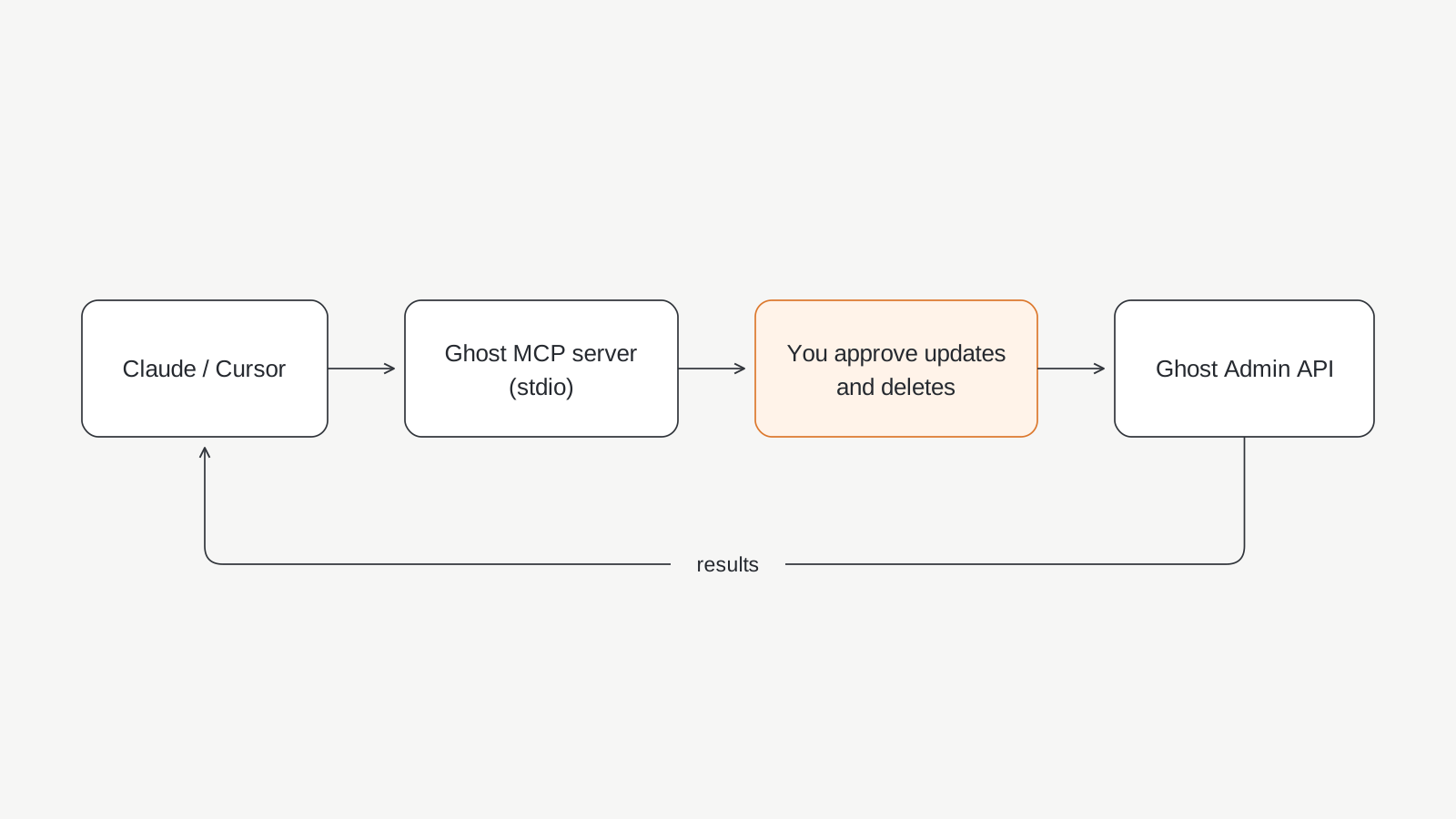
This server exposes everything, including delete_post, delete_member, delete_user, upload_theme, activate_theme and the generic ghost_api_request. Deleted posts and members usually can't be restored. That's the cost of full API coverage, so the safety has to come from how you run it.
The rules I follow:
- Use a separate integration key just for MCP. If anything looks wrong, delete that integration and the key is dead.
- Require manual approval for every write. In Claude Desktop, Claude Code and Cursor, set every
update_*anddelete_*tool, plusupload_theme,activate_themeandghost_api_request, to ask first. Read tools can run freely. - Back up before bulk work. In Ghost Admin, go to Settings → Advanced → Import/Export, open Export and export All data (Ghost's export guide). On Ghost(Pro) the download link arrives by email.
- Get a report first, change things second. Every prompt above starts with a list and no changes.
- Keep new content as drafts. I never let it publish or send a newsletter on its own.
- Treat site content as untrusted. When the AI reads posts, comments or member data, any instructions hidden in that text land in its context. Approval prompts are what stop a sneaky line in a post from turning into a real API call.
The server adds a few guardrails of its own. It refuses to follow redirects, rejects relative and hidden file paths for uploads, never overwrites an existing file on download, and tells the model to check Ghost before retrying a failed mutation, because the first attempt may have gone through. None of that replaces approval prompts. It just removes some easy ways to get hurt.
If you're building apps with AI as well as blogging with it, the same thinking applies there. I wrote up the app side in this AI-built app security checklist.
Ghost MCP server vs ghst vs other options
There are three serious options as of November 2026: the official ghst CLI from the Ghost team, which is still a beta, the community MFYDev/ghost-mcp server, and mine. I only looked at the others after I'd built mine. This is how they line up.
| proars/ghost-mcp-server | ghst (TryGhost) | MFYDev/ghost-mcp | |
|---|---|---|---|
| What it is | MCP server | CLI with an MCP mode | MCP server |
| Maintained by | me, community | TryGhost organization | community |
| Install | npx -y @proars/ghost-mcp-server |
CLI install, then ghst mcp stdio |
see repo |
| Auth | integration key or staff token | staff access token | Ghost Admin API key |
| Coverage | 60 tools plus any of 253 routes | aims to cover the whole Admin API | posts, pages, tags, members and more |
| Status | 2.2.x, active | beta, pre-1.0 | last updated April 2026 |
ghst is the one to know about. It comes from the TryGhost GitHub organization, was announced as a developer beta in March 2026, and has an MCP mode (ghst mcp stdio or ghst mcp http). Its README says it's pre-1.0 and not yet stable. If you live in the terminal and want the tool closest to Ghost itself, try it.
MFYDev/ghost-mcp is the best-known community server and the one most directories list.
There's also no native MCP endpoint inside Ghost yet. People have proposed one on the forum, and so far the answer has been to point at ghst.
Where mine fits: you want an MCP server first, something you add to Claude Desktop or Cursor with one config block, and you want the AI to reach any Admin API route, not just a curated set. Whichever you pick, read the source before you give it an Admin key. That's true for mine too.
What it doesn't do
Some limits are worth knowing up front:
- it uses the Admin API only, not the public Content API
- it doesn't do login, cookie sessions or 2FA, so the few routes that need a browser session are in the catalog for discovery only
- the route catalog comes from Ghost's
mainbranch, so newer routes may return 404 on an older Ghost version - the tests run against a fake local Ghost server, which proves request handling, not compatibility with every live install
- responses over 100,000 characters are truncated, so ask for specific fields on big sites instead of full post bodies
Use it as a site editor, not a ghostwriter
The writing demos get the attention, but the maintenance is where an MCP server earns its place. An AI that can see every post's metadata at once is very good at the tedious checks: what's missing, what's inconsistent, what's duplicated, what got forgotten three years ago.
That's how I use it. It finds the problems, proposes the fixes, and I approve each change. It's been reliable so far, and the audit alone turned up things I hadn't noticed.
I'm going to keep adding to it as Ghost adds routes. If something's missing, open an issue on GitHub.
If you're thinking about running the model locally instead of in the cloud for this kind of work, I wrote about where local AI is enough and where it isn't. Short version: reports are fine locally, approve the writes yourself either way.
FAQ
What is a Ghost MCP server?
It's a program that exposes the Ghost Admin API as tools an AI client can call through the Model Context Protocol. Once it's connected, you can ask Claude, Claude Code or Cursor to list posts, edit SEO fields, manage tags or create drafts in plain language, and it makes the API calls for you.
Is there an official Ghost MCP server?
Not built into Ghost itself. The closest official option is ghst, a CLI from the TryGhost organization that includes an MCP mode. As of November 2026 it's a beta and describes itself as pre-1.0. Community servers like proars/ghost-mcp-server and MFYDev/ghost-mcp are separate projects.
Does it work with Ghost(Pro) and self-hosted Ghost?
Yes, as long as you can create a custom integration and reach the Admin API. Set GHOST_API_URL to the exact API URL shown on the integration page. That matters most on Ghost(Pro) and custom domains, because the server doesn't follow redirects.
Should I use the Admin API key or the Content API key?
The Admin API key. The Content API key is read-only and only covers public content, so it can't edit posts, tags or SEO fields. Create a dedicated custom integration for the MCP server so you can revoke its key on its own.
Can Claude delete my Ghost posts through MCP?
Yes, if you let it. Delete tools are permanent and deleted posts usually can't be restored. Turn on manual approval for every update and delete tool in your client, use a separate integration key, and export a backup before any bulk changes.
Why does my post lose formatting when an AI creates it through the API?
Usually because the content was sent in a format Ghost's Lexical editor doesn't handle well. Send the body as HTML with source=html and let Ghost do the conversion on its side. It keeps headings, lists, links and code blocks far more reliably.