How to Install Linkwarden on Portainer (2026 stack with Meilisearch)
A working Portainer stack for Linkwarden 2.x: PostgreSQL, Meilisearch for full-text search, secrets in Portainer's environment variables instead of a .env file, plus updates, backups and the errors people actually hit.

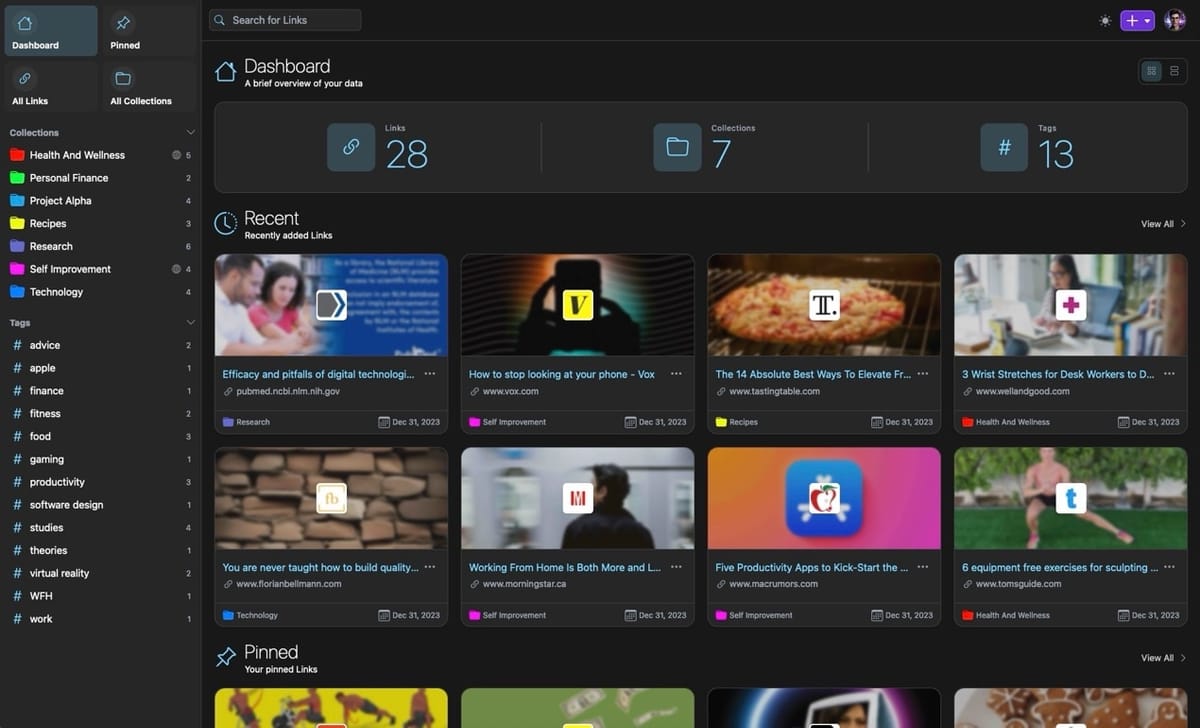
Linkwarden is a self-hosted bookmark manager that also archives the pages you save: a screenshot, a PDF and a readable copy of each link, so a bookmark still works after the site is gone. It runs as three containers (the app, PostgreSQL and Meilisearch for full-text search), which makes it a good fit for a Portainer stack.
The official install uses docker compose with a .env file next to the compose file. In Portainer that's the part that usually breaks: a stack made in the web editor has no .env on disk, so env_file: .env fails. The stack below avoids that. Secrets go into Portainer's Environment variables section and the compose file only references them.
What you need:
- Docker and Portainer CE running on a Linux host. If Docker isn't installed yet, there's a Docker install script for Ubuntu here.
- About 1 GB of free RAM. Linkwarden 2.15 cut idle memory to roughly 350 MB, and Postgres and Meilisearch add their share on top.
- A free port. I use
4222below.
The stack
This follows the official docker-compose.yml from the Linkwarden repo, with three changes for Portainer: no env_file, named volumes instead of relative ./data paths, and unless-stopped instead of always.
The same files (docker-compose.yml, .env.example and a short README) are in my GitHub repo proars/linkwarden, if you'd rather clone than copy.
services:
  postgres:
    image: postgres:16-alpine
    restart: unless-stopped
    environment:
      - POSTGRES_PASSWORD=${POSTGRES_PASSWORD}
    volumes:
      - pgdata:/var/lib/postgresql/data

  meilisearch:
    image: getmeili/meilisearch:v1.13.3
    restart: unless-stopped
    environment:
      - MEILI_MASTER_KEY=${MEILI_MASTER_KEY}
    volumes:
      - meili_data:/meili_data

  linkwarden:
    image: ghcr.io/linkwarden/linkwarden:latest
    restart: unless-stopped
    environment:
      - DATABASE_URL=postgresql://postgres:${POSTGRES_PASSWORD}@postgres:5432/postgres
      - NEXTAUTH_URL=${NEXTAUTH_URL}
      - NEXTAUTH_SECRET=${NEXTAUTH_SECRET}
      - MEILI_MASTER_KEY=${MEILI_MASTER_KEY}
    ports:
      - "4222:3000"
    volumes:
      - linkwarden_data:/data/data
    depends_on:
      - postgres
      - meilisearch

volumes:
  pgdata:
  meili_data:
  linkwarden_data:
Why the named volumes: Portainer keeps web-editor stacks under its own data directory, so a relative path like ./pgdata ends up inside Portainer's volume instead of somewhere you'd expect. Named volumes are easy to find in Volumes and easy to back up. If you prefer folders on the host, use absolute paths such as /srv/linkwarden/pgdata:/var/lib/postgresql/data.
Keep the service name meilisearch. Linkwarden connects to http://meilisearch:7700 by default when MEILI_HOST isn't set (that's the fallback in its source code). If you rename the service, add MEILI_HOST=http://your-name:7700 to the linkwarden environment.
The four variables
Generate the secrets on any Linux box:
openssl rand -hex 32
Run it three times, one value for each secret. Use hex for the Postgres password on purpose. It goes inside DATABASE_URL, and characters like @, / or # in a password break the connection string.
| Variable | What to put there |
|---|---|
POSTGRES_PASSWORD |
random hex string |
NEXTAUTH_SECRET |
another random string |
MEILI_MASTER_KEY |
a third random string |
NEXTAUTH_URL |
the address you open Linkwarden at, plus /api/v1/auth, e.g. http://192.168.1.50:4222/api/v1/auth |
The Linkwarden docs list the same set: NEXTAUTH_SECRET, POSTGRES_PASSWORD and MEILI_MASTER_KEY must be changed and must be different from each other.
Deploy it in Portainer
- Open Portainer, pick your environment and go to Stacks → Add stack.
- Name it
linkwardenand keep Web editor selected. - Paste the compose file from above.
- Scroll to Environment variables, click Add an environment variable and add the four variables from the table. Alternatively, put them in a local file and use Load variables from .env file.
- Click Deploy the stack.
The first start takes a while. The image is large, and Linkwarden runs its database migrations before the web server comes up. Watch the logs under Containers → linkwarden-linkwarden-1 → Logs until the web and worker processes have started.
Then open http://SERVER_IP:4222, click Sign up and create the first account.
Lock down registration
By default anyone who can reach the page can create an account. Once your users exist, add this to the stack's environment variables and to the linkwarden service:
- NEXT_PUBLIC_DISABLE_REGISTRATION=${NEXT_PUBLIC_DISABLE_REGISTRATION}
Set the variable to true, then click Update the stack. The sign-up link disappears.
Put it behind a domain
To reach Linkwarden at https://links.example.com instead of an IP and port, put a reverse proxy in front of port 4222 and change NEXTAUTH_URL to:
https://links.example.com/api/v1/auth
If you don't have a proxy yet, the Caddy and Portainer reverse proxy setup here gives you automatic HTTPS with very little config. After the change, update the stack so the new URL is picked up.
Updating Linkwarden
Updates are a redeploy:
- Stacks → linkwarden → Editor.
- Click Update the stack and enable Re-pull image and redeploy.
The latest tag pulls the current release, and the migrations run on start. Check the release notes before you update. Linkwarden 2.15, for example, was flagged as a security release that everyone should install.
Two images I would not bump on autopilot:
- postgres:16-alpine. A major version change (16 → 17) can't read the old data directory. Upgrading Postgres needs a dump and restore.
- getmeili/meilisearch. Its version is pinned in the official compose file for a reason. Change it only when the official file changes it.
Back up the data
Everything lives in the three volumes, but the database is the part you can't recreate. Dump it while the stack runs:
docker exec linkwarden-postgres-1 pg_dump -U postgres postgres > linkwarden-$(date +%F).sql
The container name depends on your stack name. docker ps shows it. Also copy the linkwarden_data volume, which holds the archived screenshots, PDFs and readable copies. The Meilisearch index is the only part you can rebuild.
Common problems
The page loads but login fails or loops back to the login page. NEXTAUTH_URL doesn't match the address in your browser. Fix the host, port or https, then update the stack.
P1000: Authentication failed against database server. The password in DATABASE_URL doesn't match the one Postgres was initialized with. Postgres only reads POSTGRES_PASSWORD the first time it creates the database. If you changed the variable afterwards, either set it back or remove the pgdata volume. Removing the volume deletes all bookmarks, so only do that on a fresh install.
Search finds nothing. Check that MEILI_MASTER_KEY is set on both the meilisearch and linkwarden services with the same value. If the key is missing on the linkwarden side, Linkwarden skips Meilisearch completely.
stack.env: no such file or directory or .env not found. You pasted a compose file with env_file: into the web editor. Remove the env_file lines and use the ${VARIABLE} version above.
Port already in use. Change the left side of "4222:3000" to any free port, and update NEXTAUTH_URL to match.
FAQ
Is Meilisearch required?
No. Without MEILI_MASTER_KEY, Linkwarden runs without it and you get basic search only. Advanced search with operators like tag: or before: needs Meilisearch. It's a small extra container, so I'd keep it.
Can I use an existing PostgreSQL server?
Yes. Drop the postgres service and point DATABASE_URL at your server, with a dedicated database and user for Linkwarden.
Does this work on Docker Swarm in Portainer?
The stack itself, mostly yes. Swarm ignores depends_on and restart, and docker stack deploy doesn't support env_file. Since this stack uses ${VARIABLE} substitution instead of env_file, the variables part still works.
Linkwarden vs. a plain bookmarks sync?
Browser sync only keeps the URL. Linkwarden keeps a copy of the page, so the link is still useful after the original disappears. That's the main reason to run it.