
Linux
Problem with IPv6 sudo apt-get update/upgrade
We can force to update Ubuntu using ipv4 apt-get -o Acquire::ForceIPv4=true update apt-get -o Acquire::ForceIPv4=true upgrade
Linux
We can force to update Ubuntu using ipv4 apt-get -o Acquire::ForceIPv4=true update apt-get -o Acquire::ForceIPv4=true upgrade
Linux
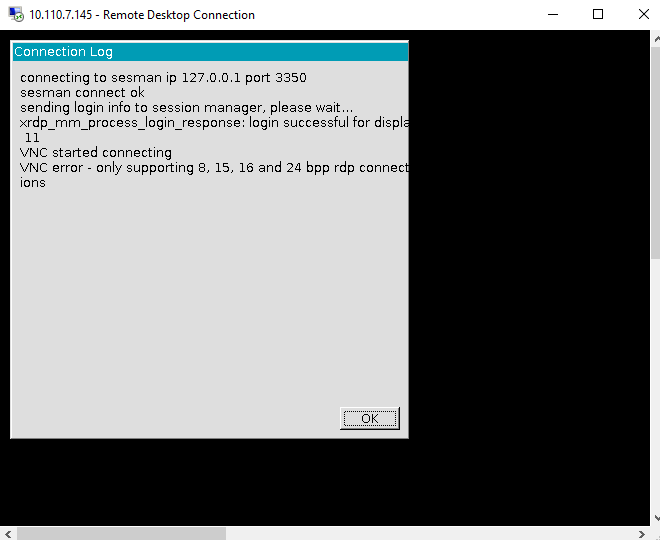
VNC error – only supporting 8,15, 16 and 25 bpp rdp connections During Remote Desktop Connection (RDP) from Windows to Linux you can face with VNC error “only supporting 8,15, 16 and 25 bpp rdp connections” It’s very easy to fix: * Open Windows RDP -> Show options * In
CentOS
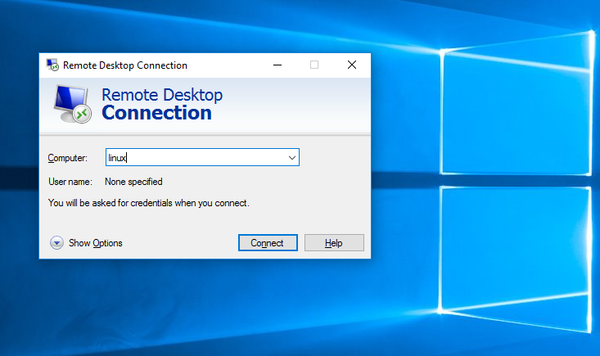
How to Remote Desktop from Windows to Linux You can connect to Linux machine from Windows using standard Windows Remote Desktop Connection (RDP). First we need xrdp package on Linux server. xrdp provides a graphical login to remote machines using RDP (Microsoft Remote Desktop Protocol). xrdp accepts connections from variety
Network
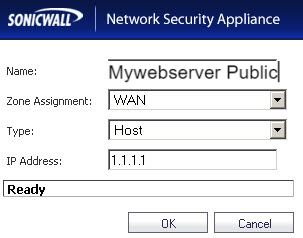
One to One NAT (1:1 NAT )allows you to translate an internal IP address into a unique IP address. 1 Create 2 Address Objects One for Server IP on LAN and another for Public IP of the server Go to Network > Address Objects. 2 Create NAT Policy This
VMware
How to fix ESXi Customizer FATAL ERROR on Windows 10 We need edit command file with text editor. Just comment one row (if “!WinVer!” LSS “5.1” call :earlyFatal Unsupported Windows Version: !WinVer!. At least Windows XP is required & exit /b 1) with REM:
Cisco
Configure Cisco Switch for FreeNAS LACP link aggregation Lets configure GigabitEthernet0/31 and GigabitEthernet0/31 switch (SW) for LACP link aggregation SW>enable SW#configure terminal Enter configuration commands, one per line. End with CNTL/Z. SW(config)#interface range GigabitEthernet0/31 - 32 SW(config-if-range)#no shut
Cisco
Here is initial configuration for Cisco switch, setup management IP and configure telnet switch>enable Password: switch# Enter to configuration mode: switch# conf t switch(config)# Configure IP address: switch(config)#interface vlan 1 (enter to VLAN 1 configuring interface mode) switch(config-if)#ip address 10.1.1.
Windows
How To Download Google Picasa final version 3.9 Google Picasa desktop client is now retired You can download Google Picasa original last version 3.9 for free For Windows and Mac Download for Windows (Windows 7, 8, 10 64bit) Download for Mac
Linux
How to capture SIP packets with tcpdump (example) tcpdump -nt -s 0 -A -i eth0 port 5060 -w call.cap Tcpdump will create file call.cap Capture DHCP requests with tcpdump
CentOS
In this article i will show how to install tcpdump on Linux (Ubuntu, Redhat) and Capture DHCP requests using tcpdump utility in Linux. DHCP requests can be captured with tcpdump. So first we need install tcpdump utility in our Linux system. Install tcpdump utility Install tcpdump in Ubuntu or Debian
CentOS
How to capture broadcast or multicast packets with tcpdump utility First install tcpdump software: For Ubuntu: # apt-get install tcpdump ForCentOS: # yum install tcpdump Then you can run tcpdump # tcpdump -n "broadcast and multicast" Example output: Discuss article in ArsTech Forum If you like what you are reading,
CentOS
VestaCP Upgrade MYSQL 5.6 for CentOS6 rpm -Uvh http://dev.mysql.com/get/mysql-community-release-el6-5.noarch.rpm You can edit file: /etc/yum.repos.d/mysql-community.repo yum update mysql-server service mysqld restart mysql_upgrade chkconfig mysqld on This will update your MySQL to