Plex drops TheTVDB on December 3: how to switch to TMDB without wrecking episode order
Plex is cutting TheTVDB on December 3, 2026 and telling everyone to flip to TMDB. For most shows that's a two-minute fix. For anime, DVD-order and Sonarr-named libraries it's how you end up with wrong titles on every episode.

Plex's fix for losing TheTVDB fits in one line: switch your TV library to The Movie Database and move on.
For a library full of normal broadcast shows, that really is the whole job.
For anime, DVD sets, shows with lots of specials, or anything Sonarr named for you, it's how you end up with the right files and the wrong episode titles on every one of them. Plex won't rename a single file, so if your file names follow TheTVDB's numbering and the metadata suddenly follows TMDB's, they drift apart.
So the short answer: before December 3, 2026, switch your aired-order shows to "The Movie Database" in Episode ordering, and leave anything on TheTVDB DVD or Absolute order alone for now. The rest of this post is how to tell which is which, and how to check without breaking anything.
What changes on December 3, 2026
On December 3, 2026, Plex stops fetching metadata from TheTVDB. Plex announced it on its forums on November 20 after it couldn't agree a new deal with the database's owner.
What that means in practice:
- nothing in your library gets deleted. Shows, settings and the metadata you already have stay as they are
- ongoing shows set to a TheTVDB episode ordering stop getting titles, summaries and artwork for new episodes and seasons. Plex says it will try to match them from other sources, with no guarantee
- shows that have finished airing barely notice, because their metadata is already complete
- the legacy "TheTVDB" agent stops working completely, so new shows and episodes in a library that still uses it won't match at all
- Jellyfin, Emby and Kodi aren't affected. This is a Plex deal that fell apart, not TheTVDB shutting down
Plex wants everyone on TMDB. The catch is in the next section.
Why "just switch to TMDB" can break your library
TheTVDB gives every show up to four orderings, and Plex exposes them in a setting called Episode ordering:
| Option in Plex | What it means |
|---|---|
| The Movie Database (Aired) | Plex's default. Broadcast order according to TMDB |
| TheTVDB (Aired) | Broadcast order according to TheTVDB. Usually the same as TMDB, not always |
| TheTVDB (DVD) | The order the episodes appear on the DVD or Blu-ray release |
| TheTVDB (Absolute) | One continuous number per episode, no seasons. Common for anime |
TMDB in Plex only does the first one right now. Plex says TMDB "episode groups", which would cover DVD and absolute order, are coming in a future update. There's no date, and nobody has promised they'll match TheTVDB's orderings one for one.
Here's where it goes wrong. Your files are named something like Show (2010) - s04e26.mkv. If that s04e26 came from TheTVDB's DVD order, and you flip the show to TMDB aired order, Plex looks up season 4 episode 26 on TMDB and attaches whatever TMDB calls that episode. Different title, different summary, sometimes an episode that doesn't exist in that season at all.
Even plain aired order can differ. TMDB and TheTVDB sometimes disagree on how specials are numbered or where a split season starts, and Plex users on Reddit have reported TMDB folding several anime seasons into one.
The classic example is Firefly. Fox aired the episodes out of order and skipped the two-part pilot "Serenity" at first, so in broadcast order it isn't episode 1. On the DVD set it is. If your Firefly files follow DVD order and the show flips to TMDB aired order, almost every episode gets the wrong title.
Check what your library uses
There are two places this setting lives, and the second one is the one people miss.
Library level. In Plex Web (signed in as the server owner), hover over the TV library in the sidebar, click the three dots, choose Edit Library, then the Advanced tab. Look at Episode ordering and at the Agent at the top.
- If Agent says Plex TV Series (or "Plex Series"), you're on the modern agent. Good.
- If Agent says TheTVDB, you're on the legacy agent that dies on December 3. That library needs attention no matter what else you decide.
Show level. Open any show, click Edit (the pencil), go to Advanced, and look at Episode ordering again. If it says anything other than "Library default", that show overrides the library. Changing the library setting does nothing for it.
If you've been fixing episode order by hand for years, you probably have a dozen of these overrides and don't remember which ones. Those are exactly the shows most likely to be on DVD or absolute order.
Sort your shows into four groups before you touch anything
Don't flip the whole library and hope. Sort first. It takes 15 minutes for a few hundred shows if you go by memory and spot-check the weird ones.
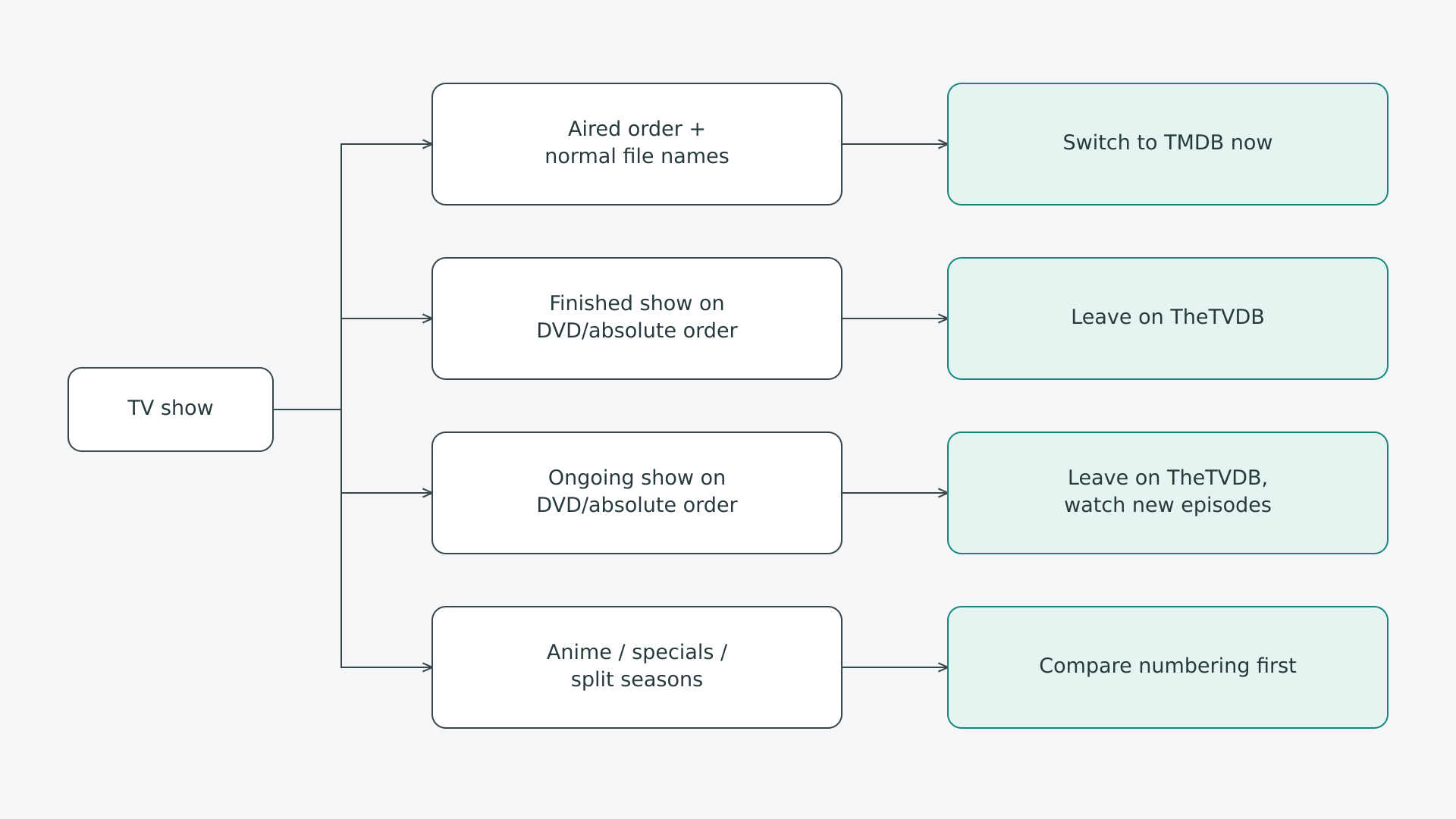
- Aired order, normal file names, still airing or finished. Most of your library. Switch to TMDB now.
- Finished shows on TheTVDB DVD or Absolute order. Leave them. Their metadata is complete and won't change anyway.
- Ongoing shows on DVD or Absolute order. Mostly anime. Leave them on TheTVDB for now and expect new episodes to show up without proper titles until Plex ships episode groups or you rename.
- Anime, shows with lots of specials, split seasons. Even if they're on aired order, compare TMDB's numbering with your files before switching. These are where TMDB and TheTVDB disagree most.
My rule: if you can't say from memory which ordering a show uses, treat it as group 4 and check it.
How to switch a library to TMDB
For group 1 shows, the switch is quick:
- Hover over the TV library, click the three dots, choose Edit Library.
- Open Advanced, set Episode ordering to The Movie Database, and save.
- For every show you set up by hand, open Edit → Advanced and set Episode ordering to The Movie Database (or back to "Library default").
- Refresh metadata on the library.
- Spot-check a few shows. Look at the first episode of a couple of seasons. If episode 1's title is wrong, the rest of that season is usually wrong too.
If a library still uses the legacy TheTVDB agent, switch the agent to Plex TV Series in the same Edit Library screen. Plex will offer to upgrade the library. Do this one before December 3, because after that the old agent stops matching new items.
Watched status should survive the switch, since Plex ties it to the episode items in your library. Where numbering shifts between the two databases, check long-running shows afterwards anyway.
Give Plex the TMDB ID so it matches the right show
Switching ordering is half the job. The other half is making sure Plex matches the right show on TMDB, especially remakes, shows with common names and anime with three different English titles.
Plex reads database IDs from folder names. The Plex naming guide recommends always including the year, and you can add the ID in curly braces next to any TVDB ID you already have:
/media/tv/
  Example Show (2020) {tvdb-12345} {tmdb-67890}/
    Season 01/
      Example Show (2020) - s01e01 - Pilot.mkv
To see which show folders don't have a TMDB ID yet, run this on the server (change the path to your TV library):
find /media/tv -mindepth 1 -maxdepth 1 -type d ! -name '*{tmdb-*' | sort
It only lists folders, it doesn't change anything. The TMDB ID is the number in the show's URL on themoviedb.org.
If you'd rather not rename folders (Sonarr or another tool owns those names), use a .plexmatch file in the show's folder instead. It's a plain text file named exactly .plexmatch, not .plexmatch.txt:
title: Example Show
year: 2020
tmdbid: 67890
An ID in .plexmatch overrides the title, year and folder name hints. After adding it, refresh metadata on that show.
If you use Sonarr, read this before switching
Sonarr numbers episodes from TheTVDB. If Sonarr names your files, those file names follow TheTVDB's numbering, including its DVD or absolute order when you've set a series that way (anime mode uses absolute numbering).
That makes Sonarr libraries the riskiest ones to flip blindly. For normal aired-order shows TheTVDB and TMDB usually agree and you're fine. For anime and anything with odd specials, keep those shows on TheTVDB ordering in Plex until episode groups exist. Sonarr will keep naming files the TheTVDB way regardless of what Plex does.
If your stack runs in Docker, nothing about the containers changes here. This is purely a metadata setting inside Plex. My Docker install script for Ubuntu and Caddy + Portainer reverse proxy setup still apply as written.
What about anime and DVD-order shows long term?
For now, the honest answer is: leave them on TheTVDB ordering, accept that new episodes of ongoing shows won't get proper metadata after December 3, and wait for Plex to ship TMDB episode groups.
When that happens, you'll be able to pick a TMDB episode group per show, the same way you pick DVD or absolute order today. Whether TMDB's groups line up with what TheTVDB had for your specific shows is something you'll have to check show by show.
The other route is renaming files to TMDB numbering. It's a lot of work for a big anime library, and if TMDB merges seasons that TheTVDB kept separate, you'll be renaming into a structure you may not like. I'd only do it for a handful of ongoing shows you actually watch week to week.
Is this the push to move to Jellyfin?
For some people, yes. Jellyfin still supports TheTVDB through a plugin and isn't affected by this change. It's free and open source, and it runs fine on modest hardware, including the kind of box from my Raspberry Pi weekend projects list for small libraries without heavy transcoding.
But I wouldn't migrate a whole media server because of one metadata deal. Plex's apps on TVs and consoles are still the reason most families stay. If the only problem is a few anime shows, running Jellyfin next to Plex for just that library is a smaller move than replacing everything.
My take
For most Plex libraries, December 3 is a two-minute change and a refresh. Do it this week so you're not finding broken shows on a Friday night.
The people who'll get burned are the ones who flip the whole library to TMDB without checking the shows they tuned by hand years ago. Find those overrides first. Leave DVD and absolute order alone until Plex ships episode groups, and add TMDB IDs to your folders now so the next match is boring.
FAQ
Will Plex delete my TheTVDB metadata on December 3?
No. Plex says existing libraries, settings and metadata stay exactly as they are. What stops is new metadata from TheTVDB, so shows that are still airing won't get titles, summaries or artwork for new episodes through TheTVDB ordering.
Does switching to TMDB reset my watched history?
It shouldn't. Watched status belongs to the episodes in your library, and changing the metadata source doesn't remove them. If TMDB numbers some episodes differently, the watched flag can end up next to a different episode title, so check long-running shows after the refresh.
How do I keep DVD order or absolute order in Plex?
Keep the show on TheTVDB (DVD) or TheTVDB (Absolute) episode ordering for now. TMDB in Plex doesn't offer those orders yet, and Plex says TMDB episode groups will add them in a future update without giving a date. Finished shows keep their metadata, while ongoing ones stop getting new episode details after December 3.
Is Jellyfin affected by Plex dropping TheTVDB?
No. This is a licensing issue between Plex and TheTVDB's owner, not TheTVDB shutting down. Jellyfin, Emby and Kodi keep working with TheTVDB as before.
What happens if I'm still on the legacy TheTVDB agent?
The legacy TheTVDB agent stops working on December 3, 2026. Existing items keep their metadata, but new shows and episodes in that library won't match. Switch the library to the Plex TV Series agent in Edit Library before the deadline.